 Click and collect in 1 hour on thousands of products
 Free next day delivery on orders over £125
 Check out our latest news
 Star buys on selected products
 Keep up to date with the newest products
 Read our latest reviews
Avery MPI 1103 Easy Apply Smart Wrap+ Vehicle Wrap 50m Roll


Central UK Location
Daily deliveries throughout
the UK and Europe
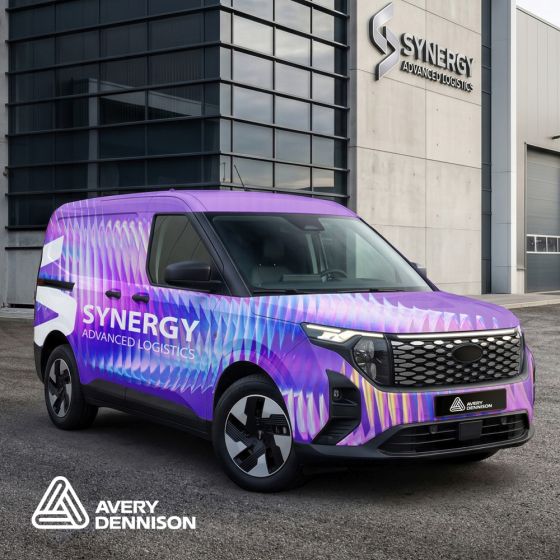
Avery Dennison MPI 1103 EA Smart Wrap+
Avery Dennison MPI 1103 EA Smart Wrap+ is a premium gloss white cast vinyl designed for high-performance vehicle wraps and long-term graphics. Its highly conformable construction makes it ideal for complex surfaces, including curves, rivets, and corrugations.
Engineered for exceptional print quality, MPI 1103 EA Smart Wrap+ delivers vibrant, durable graphics across all major digital printing platforms, including Latex, Eco-Solvent, Hard Solvent, and UV-curable inks.
The enhanced Easy Apply™ liner simplifies installation by allowing the film to conform smoothly over challenging surfaces without the need for primers or relief cuts in most applications. A repositionable permanent adhesive enables easy alignment during installation, helping achieve a professional, bubble-free finish.
Key Features
- Premium gloss white cast vinyl
- Highly conformable for complex curves, rivets, and corrugations
- Outstanding print quality with Latex, Eco-Solvent, Hard Solvent, and UV-curable inks
- Enhanced Easy Apply™ technology for faster, easier installation
- Repositionable permanent adhesive for accurate placement
- Ideal for full and partial vehicle wraps, fleet graphics, and long-term outdoor applications
This Easy Apply vehicle wrap media provides vibrant colour and enhanced durability, especially when paired with the dedicated DOL 1360Z* Smart Lam overlaminate.
50 metres on a full roll.
Printed sample available upon request.
Conversion
MPI 1103 EA Smart Wrap+ is engineered to deliver outstanding, consistent print quality across all major wide-format inkjet printing platforms. For maximum colour vibrancy, UV protection, and resistance to scratches and abrasion, the printed graphic should be paired with a compatible overlaminate.
For applications on corrugated surfaces or vehicle wraps with complex contours, Avery Dennison DOL 1360 Z Gloss Conformable Overlaminate is recommended to provide superior protection and extend the life of the finished graphic.
Application Recommendations
- Compatible with all major wide-format inkjet printer platforms.
- Use a suitable overlaminate to improve durability, UV resistance, and colour longevity.
- For corrugated vehicles and challenging surfaces, Avery Dennison DOL 1360 Z Gloss Conformable Overlaminate is recommended.
- Dry application only. Wet application methods are not recommended for Avery Dennison Easy Apply™ products.
- For optimum print quality, use the correct ICC colour profiles and recommended printer settings.
|
KEY FEATURES
|
KEY BENEFITS
|
POSSIBLE APPLICATIONS
|

Avery Dennison MPI 1103 Smart Wrap + Product Specification
Download the Product Specification for MPI 1103 Smart Wrap + here
Product Overview for Avery MPI 1103 Easy Apply Smart Wrap+ Vehicle Wrap
Download the product overview for Avery MPI 1103 Easy Apply Smart Wrap+ Vehicle Wrap here
Avery Dennison Digital Media printing guidelines emphasise proper media handling, printing setup, and finishing processes to ensure optimal print quality and performance. These guidelines cover aspects like media profiles, drying times, application techniques, and troubleshooting.
1. Print Preparation
Media Profiles
Ensure the correct media profile is installed and selected in your print server. This profile contains information about the printer, RIP, ink, and the specific Avery Dennison media being used.
Drying
For solvent printing, films need to be fully dried before applying overlaminates. A 24-hour drying time is generally sufficient for full solvent inks, while 48 hours is recommended for eco-/mild solvent inks. Allow for longer drying if a lot of ink is deposited.
Winding
When drying, avoid tightly winding the material on a core, as this can hinder solvent evaporation. Loosely wound or stacked sheets are preferred.
2. Printing
Resolution
For sharp, clear images, a resolution of 300 DPI is recommended.
Colour Matching
Digital printing may have limitations in achieving precise Pantone or specific colour shades.
3. Finishing
Overlaminates
If applying overlaminates, ensure the printed material is thoroughly dry to prevent potential issues.
Cutting
For cutting, ensure the blade is clean and sharp.
Stabilisation
After curing, allow 4-8 hours for the ink and substrate to stabilize before die-cutting, pre-masking, or chemical resistance testing.
4. Application
Surface Preparation
Clean the substrate thoroughly before applying the media.
Application Tools
Use a squeegee with overlapping strokes, applying moderate pressure.
Temperature
Avoid applying films in extreme temperatures. If necessary, use a heat gun to gently warm the material during application.
Troubleshooting
If bubbles or wrinkles occur, try using a heat gun or repositioning the film with the Avery Dennison Easy Apply™ or RS technology.
5. Cleaning and Maintenance
Cleaning
Use a gentle cleaning solution (water with a small amount of soap) and a soft cloth. Avoid using harsh chemicals or abrasive materials.
Pressure Washing
Use pressure washing with caution, keeping pressure below 1200 psi and water temperature below 120° F.
6. Additional Tips
Testing
Thoroughly test all performance characteristics, including print quality, durability, and chemical resistance, before each production run.